This is quick how-to share CC2652RB over network to zigbee2mqtt (Home Assistant) via ser2net. This tutorial is for RaspberryPi.
In this tutorial ser2net will be named as ser2net2. To not have collision in case you will install older version from repository via apt install ser2net. Also it will listen on port 3452 in configuration below.
If your application can’t start anymore on port 80 or you see HTTP Error 404. The requested resource is not found. it looks like http.sys placed reservation of port 80 and your application can’t start anymore.
If you initialize Kubernetes cluster with kubeadm check with the network team if the ranges you provide to kubeadm with – pod-network-cidr and – service-cidr does not overlap with intranet network ranges. Otherwise, pods/services won’t operate well and you might see anomalies in your Kubernetes environment.
I was solving issues during large docker layers being uploaded to the SaaS Artifactory docker repository. Docker failed on large layers with the following error message:
If you use Cloudflare proxy servers to secure your web services I recommend you to allow external traffic only from Cloudflare. Otherwise you expose your web servers to attackers from the external network.
Ansible/Packer over WinRM can experience UAC Elevated rights issues if logged over the network.
To fix the issue:
# Set LocalAccountTokenFilterPolicy to 1
$token_path = "HKLM:\SOFTWARE\Microsoft\Windows\CurrentVersion\Policies\System"
$token_prop_name = "LocalAccountTokenFilterPolicy"
$token_key = Get-Item -Path $token_path
$token_value = $token_key.GetValue($token_prop_name, $null)
if ($token_value -ne 1) {
    Write-Host "Setting LocalAccountTokenFilterPolicy to 1"
    if ($null -ne $token_value) {
        Remove-ItemProperty -Path $token_path -Name $token_prop_name
    }
    New-ItemProperty -Path $token_path -Name $token_prop_name -Value 1 -PropertyType DWORD > $null
}
To better protect those users who are members of the local Administrators group, we implement UAC restrictions on the network. This mechanism helps prevent against loopback attacks. This mechanism also helps prevent local malicious software from running remotely with administrative rights.
In case you want to get maximal value without rounding/flooring – to be exact you should not use Measure-Object. You need to enumerate array (which is also faster).
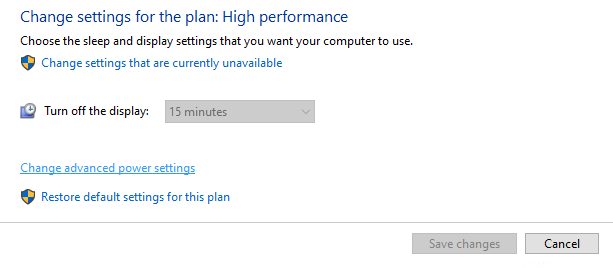
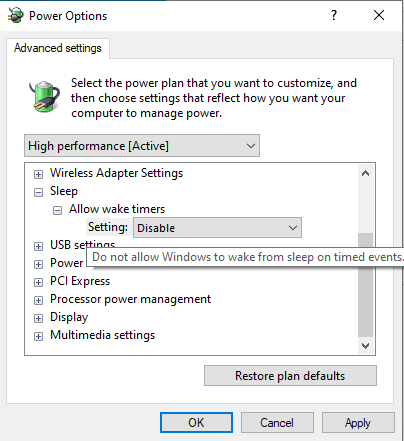
If you experience your Windows 10 machine wakes up from sleep you can disable this behavior following this manual.
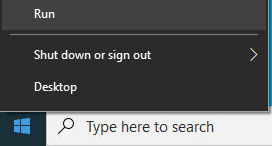
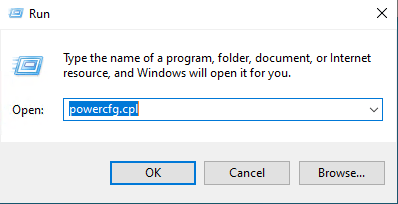
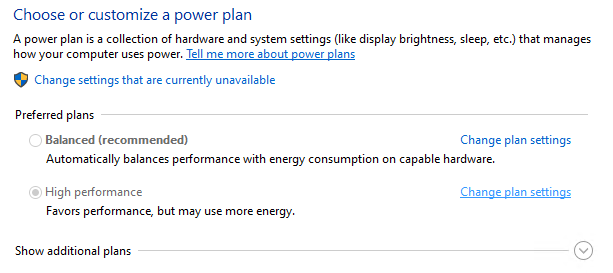
TIP:
In case your Windows Server 2012/R2 does not have access to the internet to verify MAK key you will need to do phone activation. Unfortunately you can’t do this so easily via GUI. But via CMD you can.
If you need to verify that Windows Computers/Servers are activated against KMS server by manually specified KMS server and port use following PowerShell command: